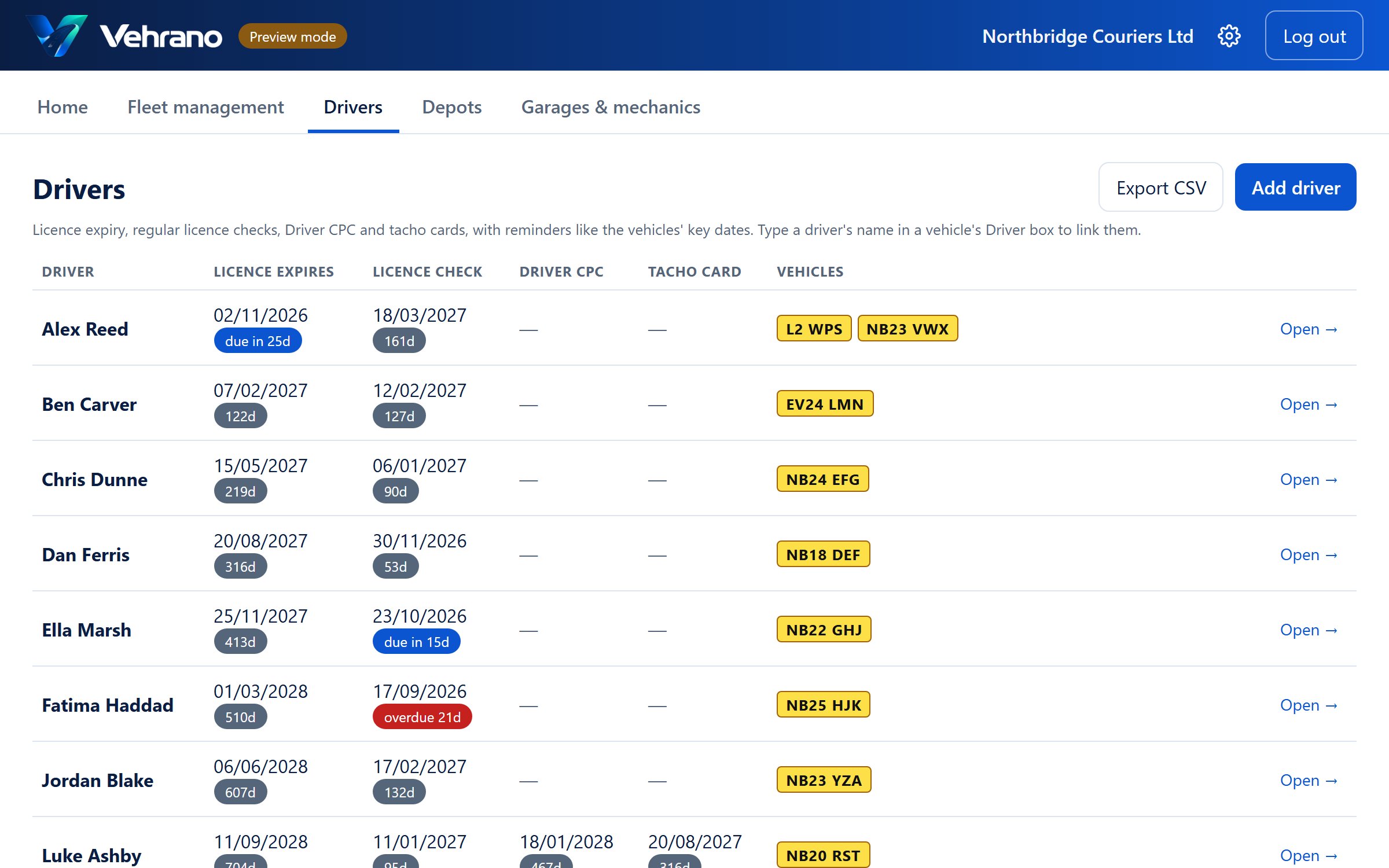
The Drivers tab on a sample fleet, with each driver's dates and the vehicles linked to them.
Vehrano keeps a record for each driver with their licence details, the date their licence was last checked, and their Driver CPC and tacho card expiry dates. It works out when each driver's next licence check is due and reminds the office before any of these dates arrives.
Driver records are part of the Standard and Enterprise editions. Vehrano is in final testing with early users and accounts open shortly.
The Drivers tab on a sample fleet, with each driver's dates and the vehicles linked to them.
Each driver record holds the following details.
A driver who leaves or stops driving can be marked inactive: the record stays, and the reminders for it stop. Only an admin can delete a driver record, and the vehicles keep the name typed on them when it goes.
Vehrano does not check a licence itself. Licences are checked with DVLA's online service using a check code from the driver, and Vehrano records the date of each check and works out when the next one is due.
The next check is the last check date plus the interval on the record. The form starts at every 6 months, and the interval can be anything from 1 to 60 months, or left blank for no licence check reminder. A driver with an interval but no check on record shows as due now, so a driver added without a check date is flagged at once.
Recording a check on the driver's page takes the date it was done, today by default and never a future date, and the page then shows the date of the next one.
Vehrano tracks four dates for each active driver: driving licence expiry, the next licence check, Driver CPC expiry and tacho card expiry. They go into the same daily email as the vehicles' key dates, 30, 14, 7 and 1 days before and on the day itself, and only to admins and office staff with reminder emails switched on. A view-only login never receives colleagues' licence details by email.
The Home screen shows the driver dates due within the window chosen for key dates, and the Drivers tab marks each date with the days left, or as overdue or expired. The fleet overview PDF includes the drivers' licence, CPC and tacho card dates that are due, on the copy produced for office staff and admins.
The vehicles' own reminders, for MOT, road tax, insurance and servicing, are covered on the MOT, tax, insurance and service reminders page.
Typing a driver's name in a vehicle's Driver box links the vehicle to the driver record, as long as exactly one active driver has that name. Renaming the driver updates the name on their vehicles. The driver's page lists the vehicles they drive, the fleet list can be searched by driver, and the reminder email names the driver beside each vehicle item.
Driver records belong to the whole business rather than to a single depot.
Linking a driver's own login to their record lets them see it in the app, and the record lists the walkaround checks they have done. A view-only login shows only the driver's own record, while office staff and admins see every driver. Licence numbers, email addresses, phone numbers and notes are shown only to office staff and admins.
Walkaround checks and defect reports from drivers' phones are part of the Enterprise edition and are covered on the walkaround checks and defect reporting page.
Office staff and admins can export the drivers list as a CSV file, with contact details, licence number and categories, licence expiry, the last and next licence check, the check interval, Driver CPC and tacho card expiry, the vehicles each driver is linked to, and whether the driver is active.
Vehrano records licence details and check dates and reminds the office about them. It does not carry out the licence check with DVLA, and it is not legal or compliance advice.